Anmelden
WhatsApp Business Nutzung WhatsApp API

28 Klicks

Widget for Sales
How can I help you?
IT / Technology
28 Klicks
AV RECONQUISTA
PRUEBA
28 Klicks
Widget para oferta comercial
Sigo Consultores y Asociados
IT / Technology
28 Klicks
Daniel Espinoza
¿Cómo puedo ayudarte?
Agency / SEO / Design
28 Klicks
FreeBookingFullDay
FreeBookingFullDay
Agency / SEO / Design
28 Klicks
Raj Hospitals (New)
By chatting, you can get the advice.
28 Klicks
Widget 1
Use our WhatsApp account for support and sales
Sonstiges
28 Klicks
Widget 1
Use our WhatsApp account for support and sales
28 Klicks
Widget 1
Use our WhatsApp account for support and sales
28 Klicks
Widget for Sales
How can I help you?
IT / Technology
28 Klicks
Masterclass Big Data con Power BI
Sé parte de nuestra Comunidad
Education
28 Klicks
carlos.sanchez.calixto
¡Únete al webinar!
Education
Vorherige
1
…
237
238
239
240
(current)
241
242
243
…
558
Nächste
Fügen Sie das Widget auf Ihrer Website hinzu
1. Kopieren Sie diesen Code
Ihr Widget-Code
Code kopieren
In die Zwischenablage kopiert
oder Ihre Schlüsselnummer (
Learn how to add your Widget to your Wordpress website
)
Schlüsselnummer kopieren
In die Zwischenablage kopiert
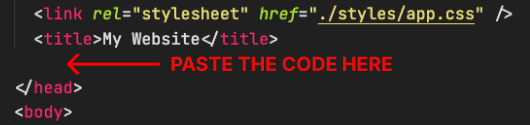
2. Fügen Sie den Code ein
Platzieren Sie den Code direkt vor dem </head>-Tag im HTML Ihrer Website